Thursday, August 20, 2020

What’s new with Azure Pipelines


Azure Pipelines, part of the Azure DevOps suite, is our Continuous Integration and Continuous Delivery (CI and CD) platform, used every day by large enterprises, individual developers, and open source projects. Today, we’re thrilled to announce new features for Azure Pipelines, including some much-requested ones:

  • Multi-stage YAML pipelines (for CI and CD)
  • Environments and deployment strategies
  • Kubernetes support

Multi-stage YAML pipelines

One of our biggest customer requests since launching YAML support for Build pipelines (CI) has been to support it for Release pipelines (CD) as well. To accomplish this, we now offer a unified YAML experience, so you can configure each of your pipelines to do CI, CD, or CI and CD together. Defining your pipelines using YAML documents allows you to check the configuration of your CI/CD into source control together with your application’s code, for easy management, versioning, and control.
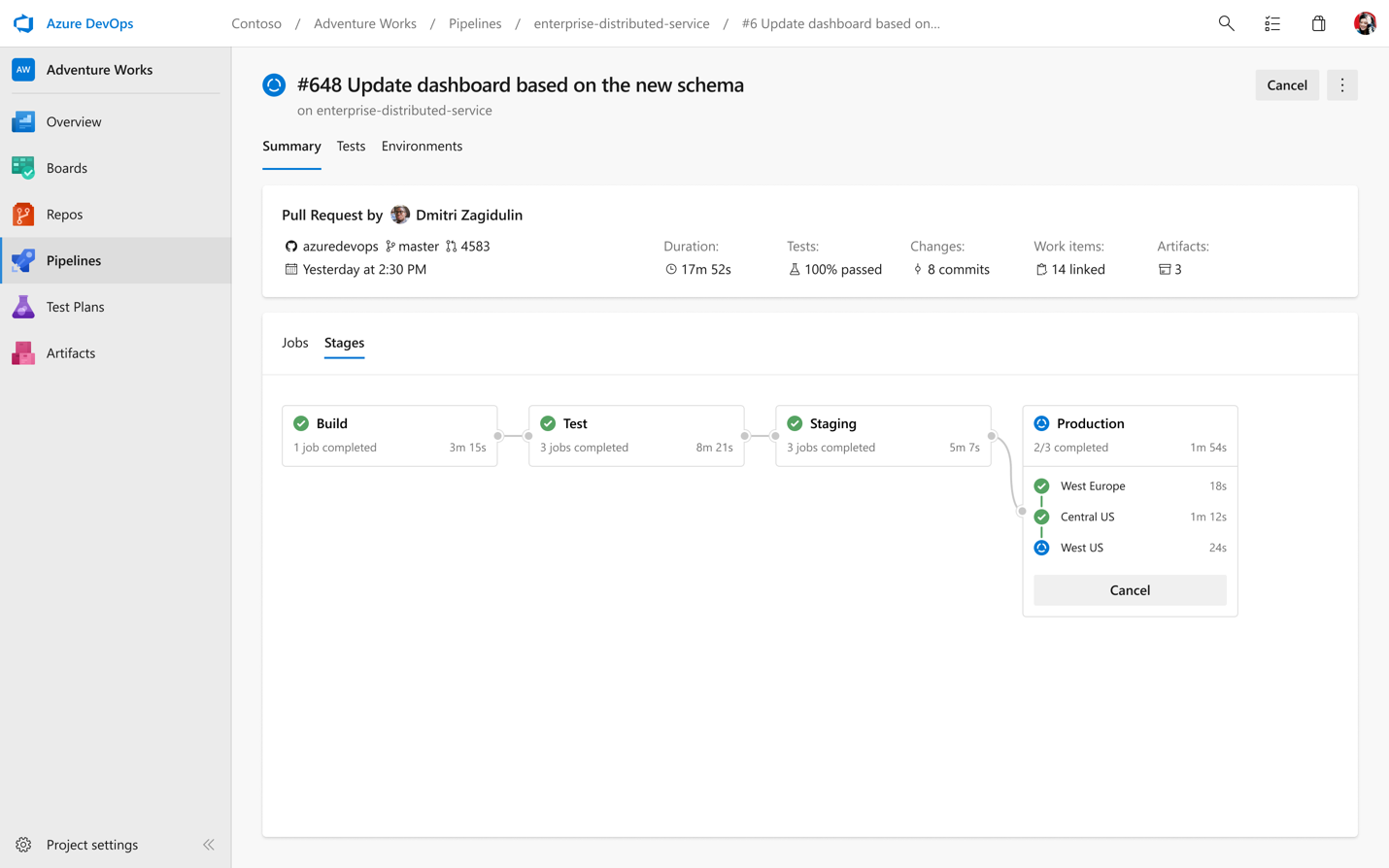
Multi-stage pipelines view

With our new YAML support, we’re also bringing a new UI to help visualize all of your multi-stage pipelines across the product, whether you’re in the run summary view, looking at all your pipeline runs, or browsing logs.
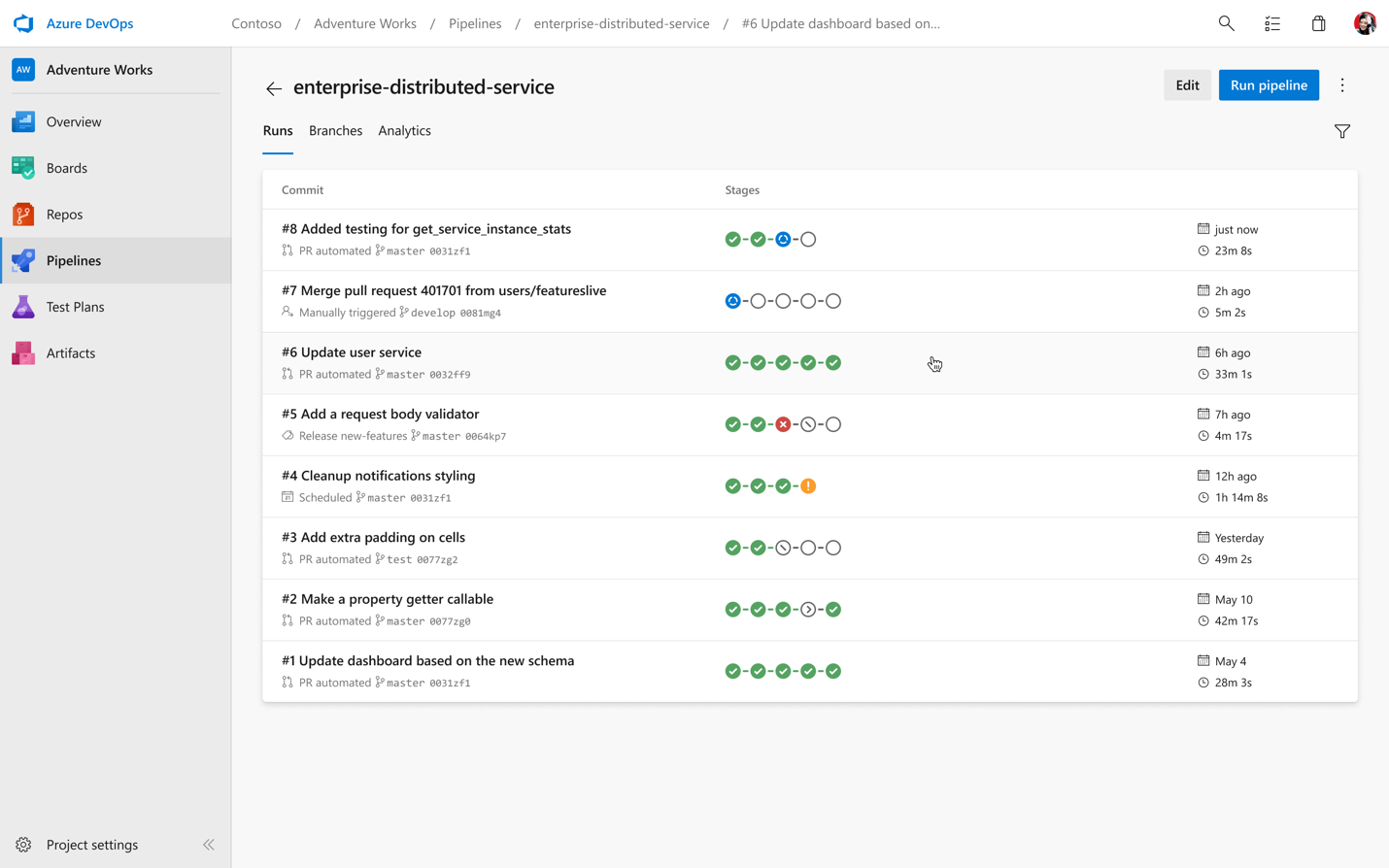
View all runs

In addition to our new pipelines pages, we have a new log viewing experience as well. This lets you easily jump between stages and jobs along with helping you quickly identify errors and warnings.
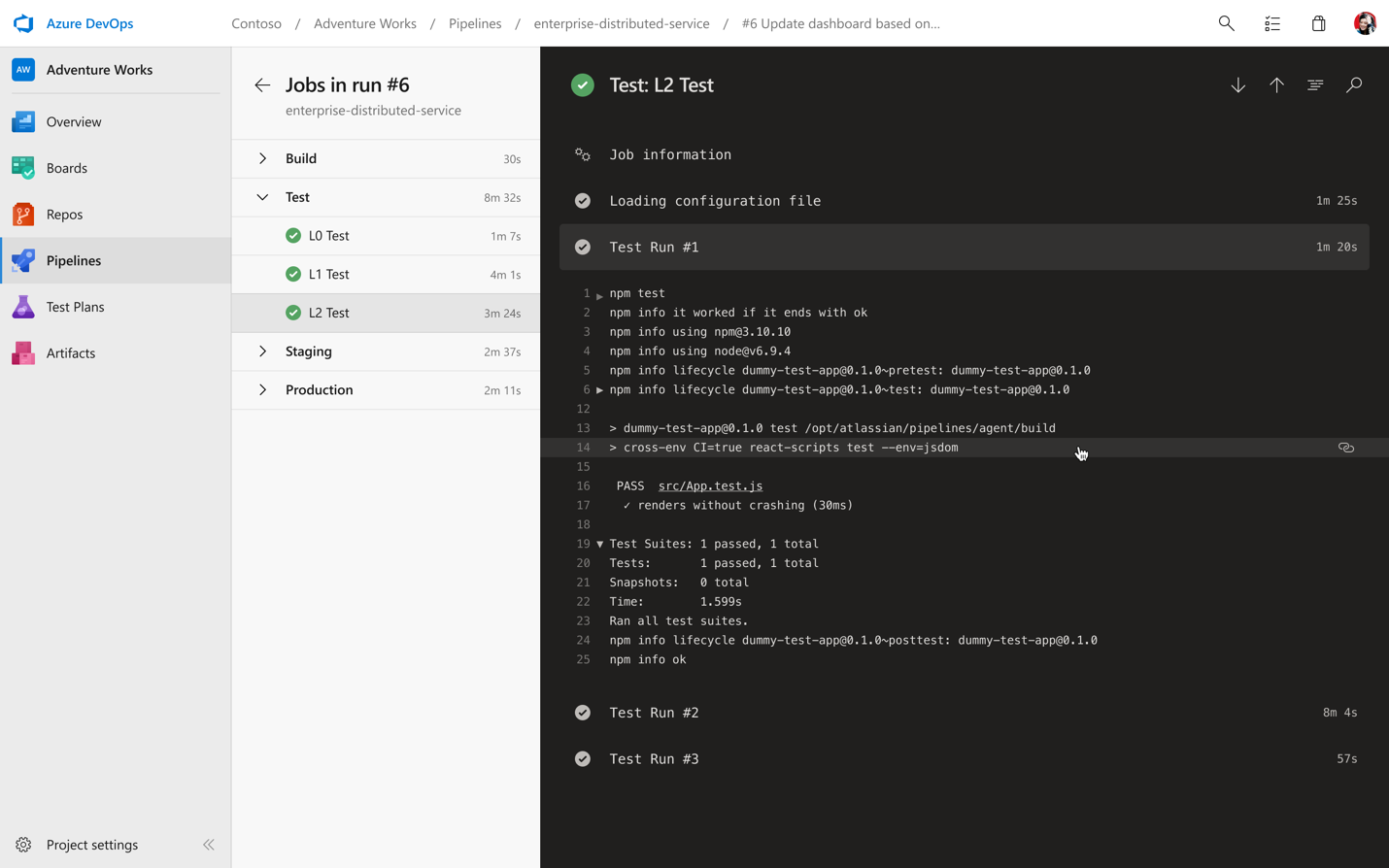
New logs view

This feature will be rolled out for all accounts over the next few days. To enable it, go to the preview features page and turn on the toggle for “Multi-stage pipelines”.

Getting going with YAML

We want you to be able to get going fast wherever your code lives. Once you connect your repo, whether it’s on GitHub, Azure Repos, or your own external Git source, we’ll analyze your code and recommend a YAML template that makes sense for you and gets you up and running quickly.
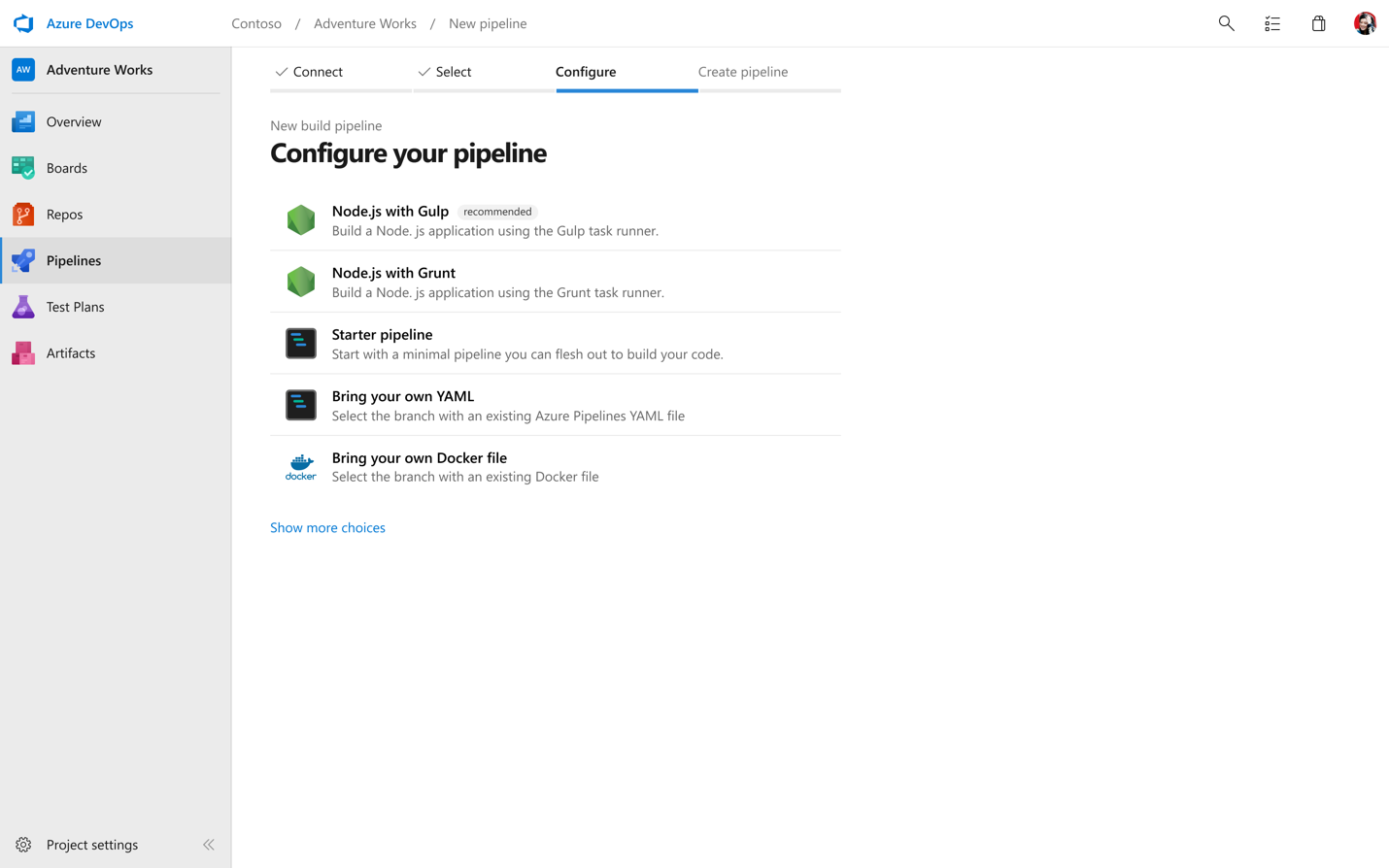
Configure pipeline from template

While we want to get you running quickly, we know you’re going to want to keep configuring and updating your YAML. To help make it even easier to edit and update your pipeline, we’ve created an in-product editor with IntelliSense smart code completion, and an easy task assistant.
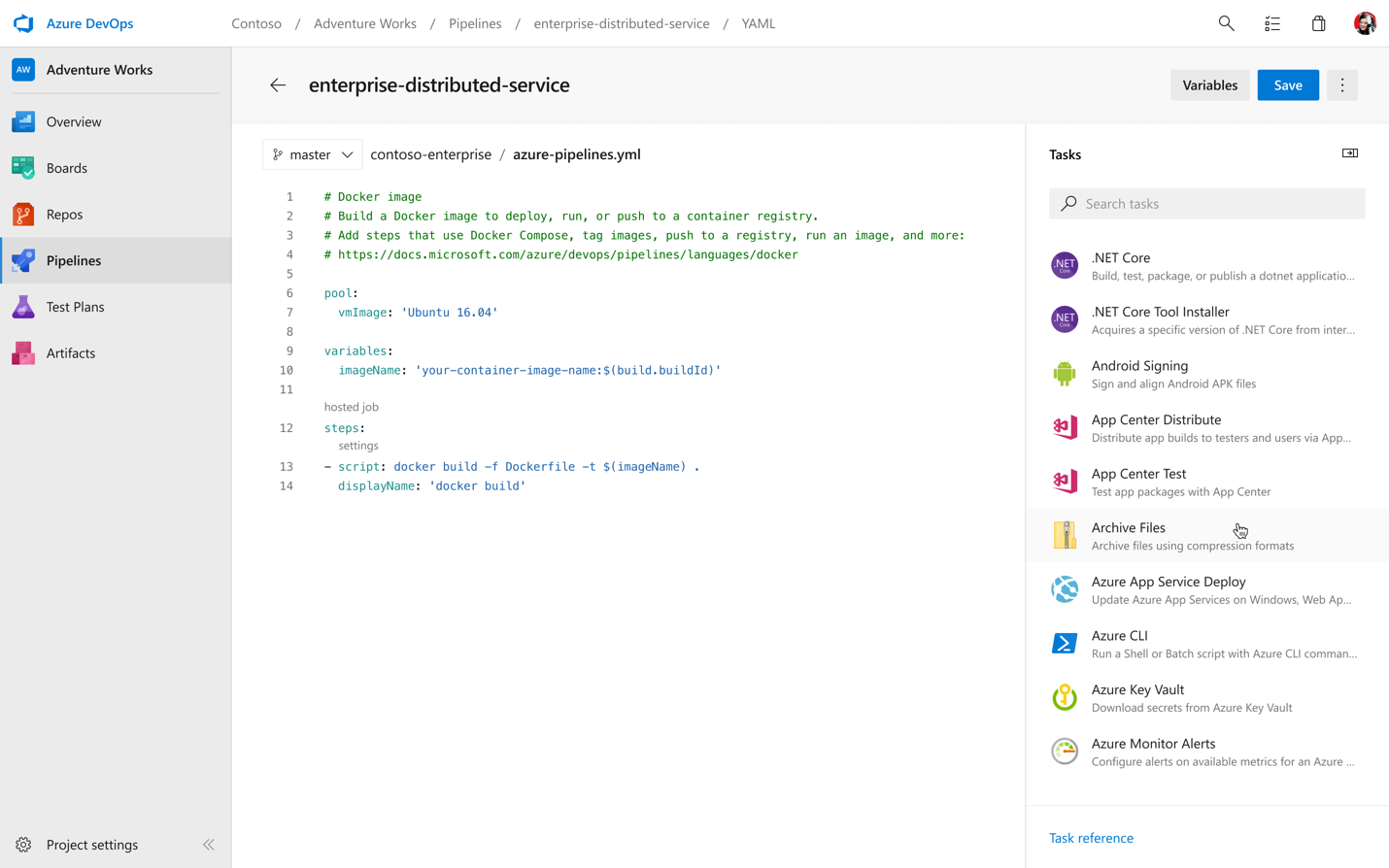
YAML editor with IntelliSense

Building your first multi-stage pipeline with environments

Bringing CD to YAML means a bunch of great additions in terms of commands and functionality. Let’s cover the basics with a simple pipeline that just builds and deploys an app in two stages.

stages:
- stage: Build
  jobs:
  - job: Build
    pool:
      vmImage: 'Ubuntu-16.04'
    continueOnError: true
    steps:
    - script: echo my first build job
- stage: Deploy
  jobs:
    # track deployments on the environment
  - deployment: DeployWeb
    pool:
      vmImage: 'Ubuntu-16.04'
    # creates an environment if it doesn’t exist
    environment: 'smarthotel-dev'
    strategy:
      # default deployment strategy
      runOnce:
        deploy:
          steps:
          - script: echo my first deployment

If we ran this pipeline, it would execute a first stage, Build, followed by a second stage, Deploy. You are free to create as many stages as you wish, for example to deploy to staging and pre-production environments.

You may notice two new interesting concepts in here if you’re familiar with our YAML schema. And if this is the first time you’re seeing our YAML, you can read up on the core concepts here.

The first new keyword is environment. Environments represent the group of resources targeted by a pipeline, for example, Kubernetes clusters, Azure Web Apps, virtual machines, and databases. Environments are useful to group resources, for example under “development”, “staging”, “production”, etc, and you can define them freely. Defining and using an environment unlocks all kinds of capabilities, for example:

  • Traceability of commits and work items
  • Deployment history down to the individual resource
  • Deeper diagnostics, and (soon) approvals and checks

There’s a lot of great new functionality available today in preview, and even more coming around the corner. You can learn more on environments here
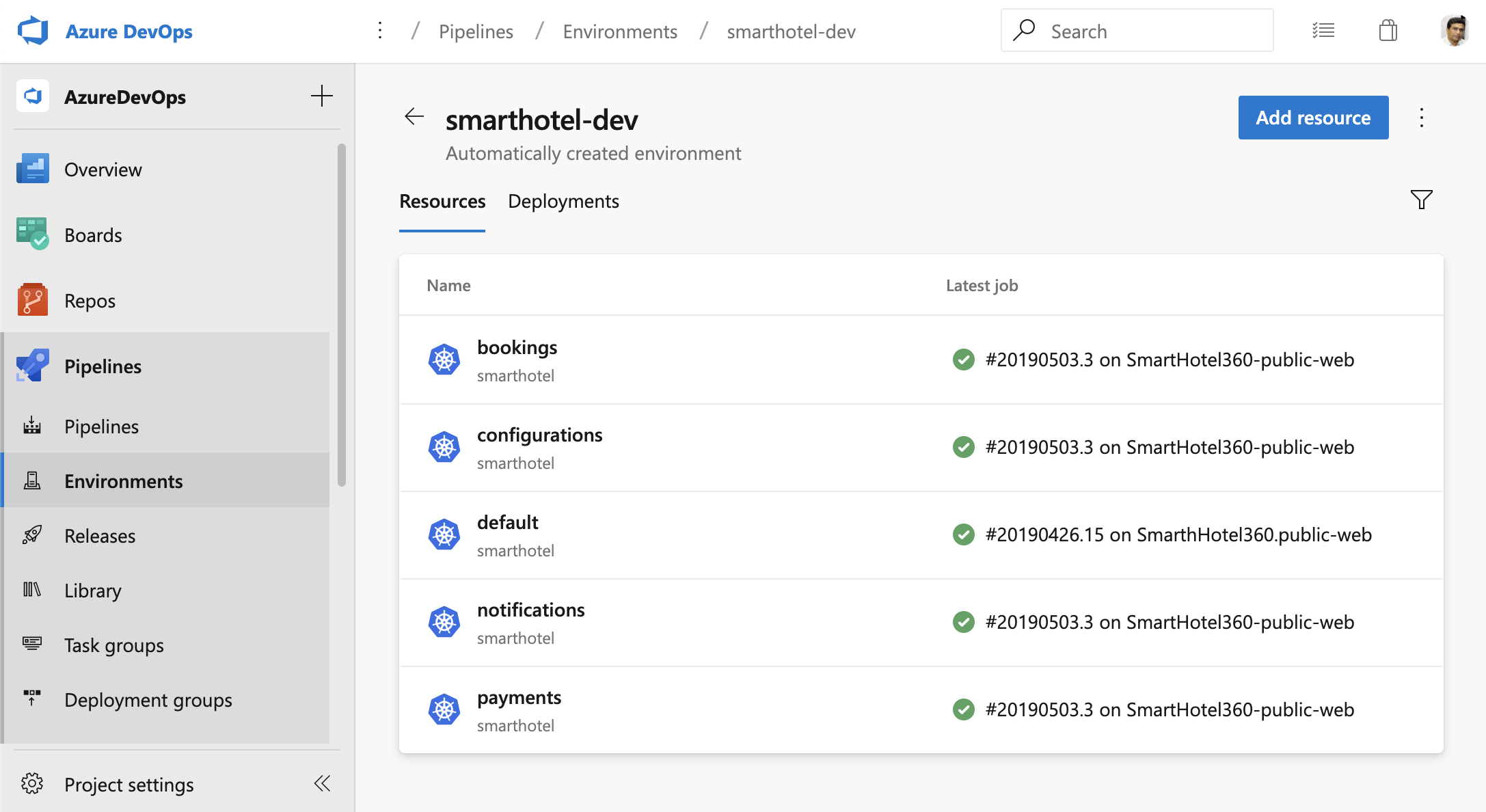
Kubernetes environments

You will also notice the strategy keyword. This impacts the deployment strategy, which defines how your application is rolled out across the cluster. The default strategy is runOnce, but in the future you’ll be able to easily indicate other strategies, such as canary or blue-green.

If you’re ready to start building, check out our documentation for building a multi-stage pipeline with environments. If you want to see some multi-stage pipeline templates to work off of, take a look at out our templates repo. You can even see those sample pipelines in action inside of our samples project.

Kubernetes

If you have an app which has been containerized (ie. there is a Dockerfile in the repository), we want to make it easy for you to setup a pipeline in less than 2 minutes, to build and deploy to a Kubernetes cluster (including Azure Kubernetes Service). Wrapping your head around Kubernetes can be hard, so we’re making it easy to both get started and continue deploying to your Kubernetes clusters. For more details, read our post on Azure Pipelines and Kubernetes.

Kubernetes is fully integrated with Azure Pipelines environments too. This lets you view all the deployments, daemonsets, etc, running on Kubernetes in each environment, completed by insights such as readiness and liveness probes of pods. You can use this information and pod-level details (including logs, containers running inside pods, and image metadata) to effectively diagnose and debug any issue, without requiring direct access to the cluster itself.
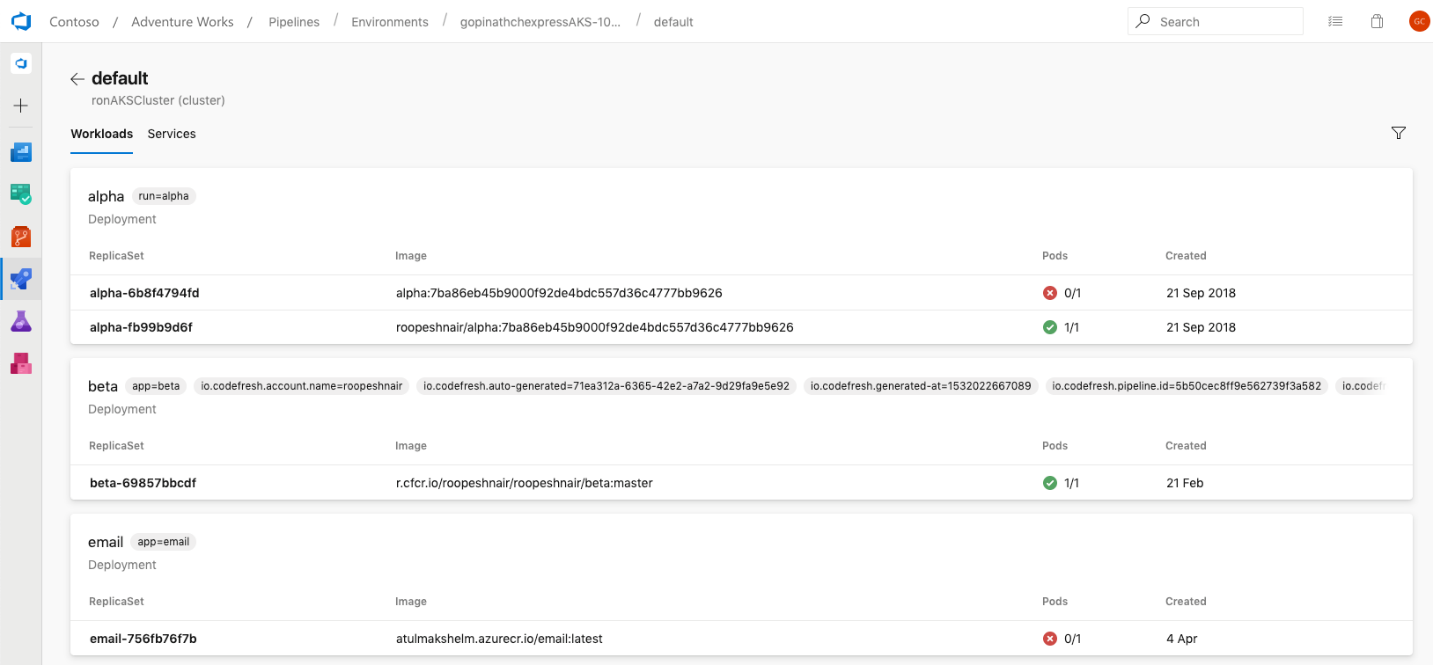
Kubernetes environments

A look at what’s next

In addition to the preview features that now available, there are so many exciting things just around the corner for Azure Pipelines we want to share:

  • Caching – We’ll be announcing the availability of another much-requested feature very shortly: caching to help your builds run even faster.
  • Checks and approvals – We’re improving multi-stage pipelines with the ability to set approvals on your environments, to help control what gets deployed when and where. We’ll keep iterating here to deliver more experiences with checks to help gating your multi-stage pipelines.
  • Deployment strategies – We’re adding additional deployment strategies as part of the deployment job type, like blue-green, canary and rolling, to better control how your applications are deployed across distributed systems.
  • Environments – We’re adding support for additional resource types in environments, so you can get going quickly with virtual machines (through deployment groups) and Azure Web Apps.
  • Mobile – With our new UX, we’re going to start to enable new mobile views in Q2 to help you view the status of pipelines, quickly jump into logs, and complete approvals.
  • Pipeline analytics – We’re continuing to grow our pipeline analytics experiences to help you get an all-up picture of the health of your pipelines, so you can know where to go in and dig deeper.
  • Tests and code coverage – We’re going to be shipping all new test and code coverage features and UX in the next months.

Thank you

Lastly, we want to thank all of our users who have adopted Azure Pipelines. Since our launch last September, we have seen tremendous growth, and we are particularly excited about the response from the open source developer community. It’s been an honor to see Azure Pipelines badges on so many open sources projects we love and use regularly ourselves. In the first eight months, public repositories have already used over 88 years of build time for Azure Pipelines for free. Check out Martin’s post for some more stats and stories from open source projects. We’ve also received so much great feedback from project maintainers to date and we can’t thank the community enough.

If you’re new to Azure Pipelines, get started for free on our website and learn more about what you can do with Azure Pipelines.

We’ll be posting more deep-dive information in the coming weeks, but as always we’d love to hear your feedback and comments. Feel free to comment on this post or tweet at @AzureDevOps with your thoughts.


Wednesday, August 19, 2020

A beginner's guide to building DevOps pipelines with open source tools


If you're new to DevOps, check out this five-step process for building your first pipeline.

Shaking hands, networking

DevOps has become the default answer to fixing software development processes that are slow, siloed, or otherwise dysfunctional. But that doesn't mean very much when you're new to DevOps and aren't sure where to begin. This article explores what a DevOps pipeline is and offers a five-step process to create one. While this tutorial is not comprehensive, it should give you a foundation to start on and expand later. But first, a story.

My DevOps journey

I used to work for the cloud team at Citi Group, developing an Infrastructure-as-a-Service (IaaS) web application to manage Citi's cloud infrastructure, but I was always interested in figuring out ways to make the development pipeline more efficient and bring positive cultural change to the development team. I found my answer in a book recommended by Greg Lavender, who was the CTO of Citi's cloud architecture and infrastructure engineering, called The Phoenix Project. The book reads like a novel while it explains DevOps principles.

A table at the back of the book shows how often different companies deploy to the release environment:

CompanyDeployment Frequency
Amazon23,000 per day
Google5,500 per day
Netflix500 per day
Facebook1 per day
Twitter3 per week
Typical enterprise1 every 9 months

How are the frequency rates of Amazon, Google, and Netflix even possible? It's because these companies have figured out how to make a nearly perfect DevOps pipeline.

This definitely wasn't the case before we implemented DevOps at Citi. Back then, my team had different staged environments, but deployments to the development server were very manual. All developers had access to just one development server based on IBM WebSphere Application Server Community Edition. The problem was the server went down whenever multiple users simultaneously tried to make deployments, so the developers had to let each other know whenever they were about to make a deployment, which was quite a pain. In addition, there were problems with low code test coverages, cumbersome manual deployment processes, and no way to track code deployments with a defined task or a user story.

I realized something had to be done, and I found a colleague who felt the same way. We decided to collaborate to build an initial DevOps pipeline—he set up a virtual machine and a Tomcat application server while I worked on Jenkins, integrating with Atlassian Jira and BitBucket, and code testing coverages. This side project was hugely successful: we almost fully automated the development pipeline, we achieved nearly 100% uptime on our development server, we could track and improve code testing coverage, and the Git branch could be associated with the deployment and Jira task. And most of the tools we used to construct our DevOps pipeline were open source.

I now realize how rudimentary our DevOps pipeline was, as we didn't take advantage of advanced configurations like Jenkins files or Ansible. However, this simple process worked well, maybe due to the Pareto principle (also known as the 80/20 rule).

A brief introduction to DevOps and the CI/CD pipeline

If you ask several people, "What is DevOps? you'll probably get several different answers. DevOps, like agile, has evolved to encompass many different disciplines, but most people will agree on a few things: DevOps is a software development practice or a software development lifecycle (SDLC) and its central tenet is cultural change, where developers and non-developers all breathe in an environment where formerly manual things are automated; everyone does what they are best at; the number of deployments per period increases; throughput increases; and flexibility improves.

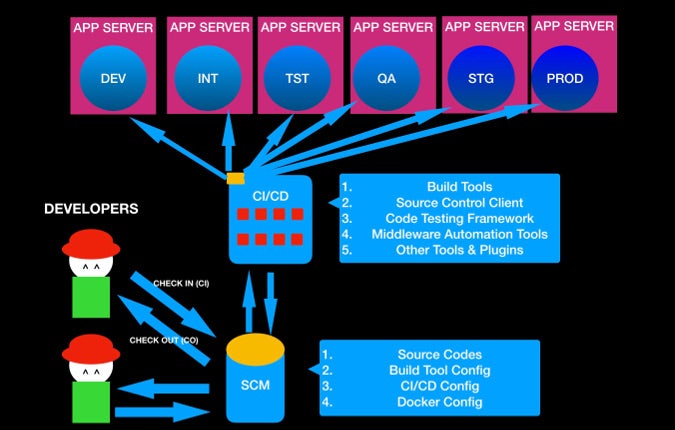
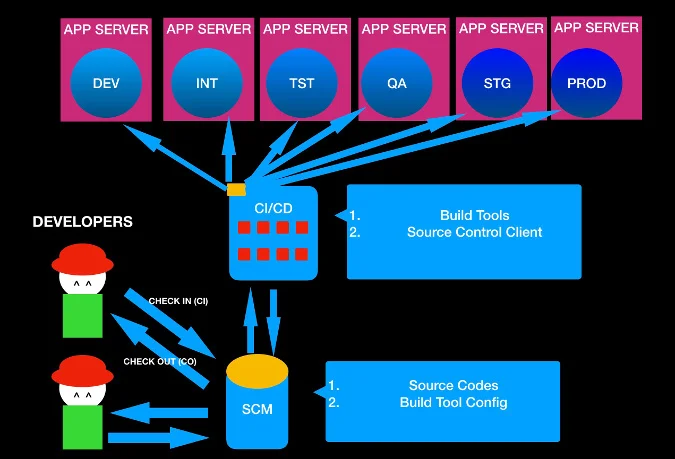
While having the right software tools is not the only thing you need to achieve a DevOps environment, some tools are necessary. A key one is continuous integration and continuous deployment (CI/CD). This pipeline is where the environments have different stages (e.g., DEV, INT, TST, QA, UAT, STG, PROD), manual things are automated, and developers can achieve high-quality code, flexibility, and numerous deployments.

This article describes a five-step approach to creating a DevOps pipeline, like the one in the following diagram, using open source tools.

Without further ado, let's get started.

Step 1: CI/CD framework

The first thing you need is a CI/CD tool. Jenkins, an open source, Java-based CI/CD tool based on the MIT License, is the tool that popularized the DevOps movement and has become the de facto standard.

So, what is Jenkins? Imagine it as some sort of a magical universal remote control that can talk to many many different services and tools and orchestrate them. On its own, a CI/CD tool like Jenkins is useless, but it becomes more powerful as it plugs into different tools and services.

Jenkins is just one of many open source CI/CD tools that you can leverage to build a DevOps pipeline.

NameLicense
JenkinsCreative Commons and MIT
Travis CIMIT
CruiseControlBSD
BuildbotGPL
Apache GumpApache 2.0
CabieGNU

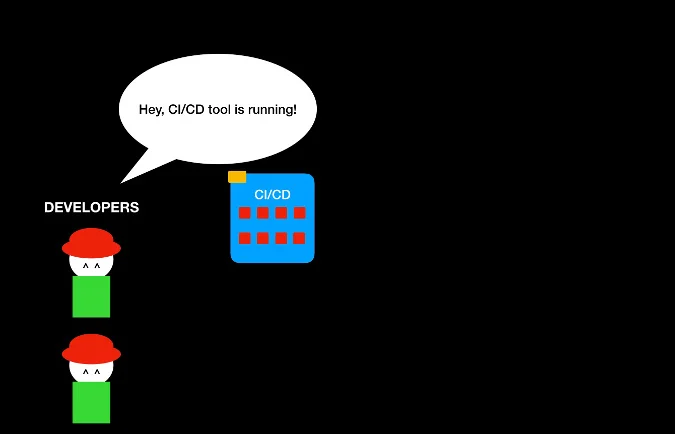
Here's what a DevOps process looks like with a CI/CD tool.

You have a CI/CD tool running in your localhost, but there is not much you can do at the moment. Let's follow the next step of DevOps journey.

Step 2: Source control management

The best (and probably the easiest) way to verify that your CI/CD tool can perform some magic is by integrating with a source control management (SCM) tool. Why do you need source control? Suppose you are developing an application. Whenever you build an application, you are programming—whether you are using Java, Python, C++, Go, Ruby, JavaScript, or any of the gazillion programming languages out there. The programming codes you write are called source codes. In the beginning, especially when you are working alone, it's probably OK to put everything in your local directory. But when the project gets bigger and you invite others to collaborate, you need a way to avoid merge conflicts while effectively sharing the code modifications. You also need a way to recover a previous version—and the process of making a backup and copying-and-pasting gets old. You (and your teammates) want something better.

This is where SCM becomes almost a necessity. A SCM tool helps by storing your code in repositories, versioning your code, and coordinating among project members.

Although there are many SCM tools out there, Git is the standard and rightly so. I highly recommend using Git, but there are other open source options if you prefer.

NameLicense
GitGPLv2 & LGPL v2.1
SubversionApache 2.0
Concurrent Versions System (CVS)GNU
VestaLGPL
MercurialGNU GPL v2+

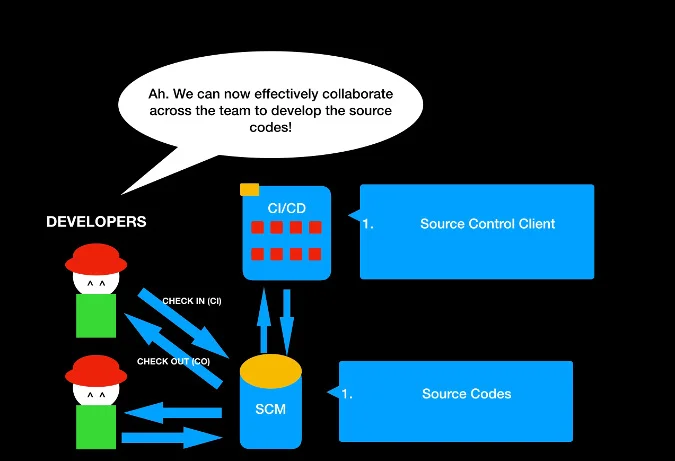
Here's what the DevOps pipeline looks like with the addition of SCM.

The CI/CD tool can automate the tasks of checking in and checking out source code and collaborating across members. Not bad? But how can you make this into a working application so billions of people can use and appreciate it?

Step 3: Build automation tool

Excellent! You can check out the code and commit your changes to the source control, and you can invite your friends to collaborate on the source control development. But you haven't yet built an application. To make it a web application, it has to be compiled and put into a deployable package format or run as an executable. (Note that an interpreted programming language like JavaScript or PHP doesn't need to be compiled.)

Enter the build automation tool. No matter which build tool you decide to use, all build automation tools have a shared goal: to build the source code into some desired format and to automate the task of cleaning, compiling, testing, and deploying to a certain location. The build tools will differ depending on your programming language, but here are some common open source options to consider.

NameLicenseProgramming Language
MavenApache 2.0Java
AntApache 2.0Java
GradleApache 2.0Java
BazelApache 2.0Java
MakeGNUN/A
GruntMITJavaScript
GulpMITJavaScript
BuildrApacheRuby
RakeMITRuby
A-A-PGNUPython
SConsMITPython
BitBakeGPLv2Python
CakeMITC#
ASDFExpat (MIT)LISP
CabalBSDHaskell

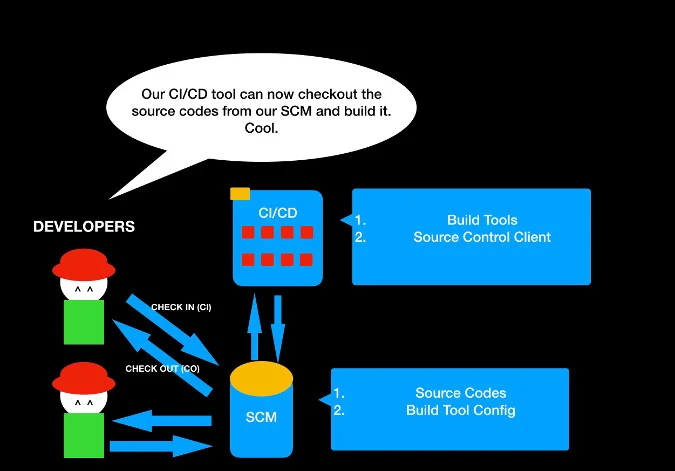
Awesome! You can put your build automation tool configuration files into your source control management and let your CI/CD tool build it.

Everything is good, right? But where can you deploy it?

Step 4: Web application server

So far, you have a packaged file that might be executable or deployable. For any application to be truly useful, it has to provide some kind of a service or an interface, but you need a vessel to host your application.

For a web application, a web application server is that vessel. An application server offers an environment where the programming logic inside the deployable package can be detected, render the interface, and offer the web services by opening sockets to the outside world. You need an HTTP server as well as some other environment (like a virtual machine) to install your application server. For now, let's assume you will learn about this along the way (although I will discuss containers below).

There are a number of open source web application servers available.

NameLicenseProgramming Language
TomcatApache 2.0Java
JettyApache 2.0Java
WildFlyGNU Lesser PublicJava
GlassFishCDDL & GNU Less PublicJava
Django3-Clause BSDPython
TornadoApache 2.0Python
GunicornMITPython
Python PasteMITPython
RailsMITRuby
Node.jsMITJavascript

Now the DevOps pipeline is almost usable. Good job!

Although it's possible to stop here and integrate further on your own, code quality is an important thing for an application developer to be concerned about.

Step 5: Code testing coverage

Implementing code test pieces can be another cumbersome requirement, but developers need to catch any errors in an application early on and improve the code quality to ensure end users are satisfied. Luckily, there are many open source tools available to test your code and suggest ways to improve its quality. Even better, most CI/CD tools can plug into these tools and automate the process.

There are two parts to code testing: code testing frameworks that help write and run the tests, and code quality suggestion tools that help improve code quality.

Code test frameworks

NameLicenseProgramming Language
JUnitEclipse Public LicenseJava
EasyMockApacheJava
MockitoMITJava
PowerMockApache 2.0Java
PytestMITPython
HypothesisMozillaPython
ToxMITPython

Code quality suggestion tools

NameLicenseProgramming Language
CoberturaGNUJava
CodeCoverEclipse Public (EPL)Java
Coverage.pyApache 2.0Python
EmmaCommon Public LicenseJava
JaCoCoEclipse Public LicenseJava
HypothesisMozillaPython
ToxMITPython
JasmineMITJavaScript
KarmaMITJavaScript
MochaMITJavaScript
JestMITJavaScript

Note that most of the tools and frameworks mentioned above are written for Java, Python, and JavaScript, since C++ and C# are proprietary programming languages (although GCC is open source).

Now that you've implemented code testing coverage tools, your DevOps pipeline should resemble the DevOps pipeline diagram shown at the beginning of this tutorial.

Optional steps

Containers

As I mentioned above, you can host your application server on a virtual machine or a server, but containers are a popular solution.

What are containers? The short explanation is that a VM needs the huge footprint of an operating system, which overwhelms the application size, while a container just needs a few libraries and configurations to run the application. There are clearly still important uses for a VM, but a container is a lightweight solution for hosting an application, including an application server.

Although there are other options for containers, Docker and Kubernetes are the most popular.

NameLicense
DockerApache 2.0
KubernetesApache 2.0

To learn more, check out these other Opensource.com articles about Docker and Kubernetes:

Middleware automation tools

Our DevOps pipeline mostly focused on collaboratively building and deploying an application, but there are many other things you can do with DevOps tools. One of them is leveraging Infrastructure as Code (IaC) tools, which are also known as middleware automation tools. These tools help automate the installation, management, and other tasks for middleware software. For example, an automation tool can pull applications, like a web application server, database, and monitoring tool, with the right configurations and deploy them to the application server.

Here are several open source middleware automation tools to consider:

NameLicense
AnsibleGNU Public
SaltStackApache 2.0
ChefApache 2.0
PuppetApache or GPL

For more on middleware automation tools, check out these other Opensource.com articles:

Where can you go from here?

This is just the tip of the iceberg for what a complete DevOps pipeline can look like. Start with a CI/CD tool and explore what else you can automate to make your team's job easier. Also, look into open source communication tools that can help your team work better together.

For more insight, here are some very good introductory articles about DevOps:

Integrating DevOps with open source agile tools is also a good idea:

Cache Design and patterns

 In this article  we will look at application design and how cache design will be helping to get data from back end quickly.  scope of this ...