Saturday, August 15, 2020

ASP.NET Core Web API – Repository Pattern

 What is a Repository pattern and why should we use it?

With the Repository pattern, we create an abstraction layer between the data access and the business logic layer of an application. By using it, we are promoting a more loosely coupled approach to access our data from the database. Also, the code is cleaner and easier to maintain and reuse. Data access logic is in a separate class, or sets of classes called a repository, with the responsibility of persisting the application’s business model.

Implementing the repository pattern is our topic for this post. Additionally, this article has a strong relationship with EF Core, so we strongly recommend reading our EF Core tutorial to get familiar or just a better understanding of that topic.

So let’s start.


VIDEO: Repository Pattern in ASP.NET Core Web API video.


If you want to see all the basic instructions and complete navigation for this series, please follow the following link: Introduction page for this tutorial.

For the previous part check out: Creating .NET Core WebApi project – Custom logging in .NET Core

The source code is available for download at .NET Core, Angular and MySQL. Part 4 – Source Code

This post is divided into several sections:

Creating Models

Let’s begin by creating a new Class Library (.NET Core) project named Entities and inside it a new folder with the name Models, which will contain all the model classes. Model classes will represent the tables inside the database and will serve us to map the data from the database to the .NET Core. After that, we should reference this project to the main project.

In the Models folder, we are going to create two classes and modify them:

As you can see, there are two models decorated with the attribute Table(“tableName”). This attribute will configure the corresponding table name in the database. All the mandatory fields have the attribute [Required] and if we want to constrain the strings, we can use the[StringLength]attribute.  In the Owner class, we have the Accounts property which suggests that one Owner is related to multiple Accounts. Additionally, we add the OwnerId and the Owner properties decorated with the [ForeignKey] attribute to state that one Account is related to only one Owner. If you want to learn more about the EF Core configuration, and we strongly suggest you do, visit the Configuring Nonrelational Properties in EF Core.

Context Class and the Database Connection

Now, let us create the context class, which will be a middleware component for the communication with the database. It has DbSet properties that contain the table data from the database. For a better understanding of the Context class and DbSet properties and how they work with EF Core overall, you can read Getting Started with EF Core article.

In the root of the Entities project, we are going to create the RepositoryContext class and modify it:

Pay attention that you have to install Microsoft.EntityFrameworkCore package.

To enable communication between the .NET core part and the MySQL database, we have to install a third-party library named Pomelo.EntityFrameworkCore.MySql. In the main project, we can install it with the NuGet package manager or Package manager console (It is important to Include prerelease because it is still in the prerelease state).

After the installation, let’s open the appsettings.json file and add DB connection settings inside:

In the ServiceExtensions class, we are going to write the code for configuring the MySQL context.

First, let’s add the using directives and then add the method ConfigureMySqlContext:

With the help of the IConfiguration config parameter, we can access the appsettings.json file and take all the data we need from it. Afterward, in the Startup class in the ConfigureServices method, add the context service to the IOC right above the services.AddControllers():

Repository Pattern Logic

After establishing a connection with the database, it is time to create the generic repository that will serve us all the CRUD methods. As a result, all the methods can be called upon any repository class in our project.

Furthermore, creating the generic repository and repository classes that use that generic repository is not going to be the final step. We will go a  step further and create a wrapper around repository classes and inject it as a service. Consequently,  we can instantiate this wrapper once and then call any repository class we need inside any of our controllers. You will understand the advantages of this wrapper when we use it in the project.

First, let’s create an interface for the repository inside the Contracts project:

Right after the interface creation, we are going to create a new Class Library (.NET Core) project with the name Repository (add the reference from Contracts and Entities to this project), and inside the Repository project create the abstract class RepositoryBase which will implement the interface IRepositoryBase.

Reference this project to the main project too. 

Let’s add the following code to the RepositoryBase class:

This abstract class, as well as IRepositoryBase interface, uses generic type T to work with. This type T gives even more reusability to the RepositoryBase class. That means we don’t have to specify the exact model (class) right now for the RepositoryBase to work with, we are going to do that later on.

Repository User Classes

Now that we have the RepositoryBase class, let’s create the user classes that will inherit this abstract class. Every user class will have its own interface, for additional model-specific methods. Furthermore, by inheriting from the RepositoryBase class they will have access to all the methods from the RepositoryBase. This way, we are separating the logic, that is common for all our repository user classes and also specific for every user class itself.

Let’s create interfaces in the Contracts project for our Owner and Account classes.

Don’t forget to add a reference from the Entities project. As soon as we do this, we can delete the Entities reference from the main project because it is now provided through the Repository project that already has the Contracts project referenced, with the Entities reference inside.

Now, let’s  create a repository user classes in the Repository project:

After these steps, we are finished with creating the repository and repository user classes. But there are still more things to be done.

Creating a Repository Wrapper

Let’s imagine if inside a controller we need to collect all the Owners and to collect only the certain Accounts (for example Domestic ones). We would need to instantiate OwnerRepository and AccountRepository classes and then call the FindAll and FindByCondition methods.

Maybe it’s not a problem when we have only two classes, but what if we need logic from 5 different classes or even more. Having that in mind, let’s create a wrapper around our repository user classes. Then place it into the IOC and finally inject it inside the controller’s constructor. Now, with that wrappers instance, we may call any repository class we need.

Let’s start by creating a new interface in the Contract project:

After that, we are going to add a new class to the Repository project:

As you can see, we are creating properties that will expose the concrete repositories and also we have the Save() method to be used after all the modifications are finished on a certain object. This is a good practice because now we can, for example, add two owners, modify two accounts and delete one owner, all in one method, and then just call the Save method once. All changes will be applied or if something fails, all changes will be reverted:

In the ServiceExtensions class, we are going to add this code:

And in the Startup class inside the ConfigureServices method, above the services.AddControllers() line, add this code:

Excellent.

Testing

All we have to do is to test this code the same way we did with our custom logger in part3 of this series.

Inject the RepositoryWrapper service inside the WeatherForecast controller and call any method from the RepositoryBase class:

Place the breakpoint inside the Get() method and you’ll see the data returned from the database.

In the next part, we are going to show you how to restrict access to the RepositoryBase methods from the controller, if you don’t want them to be exposed here.

We have created our Repository Pattern synchronously but it could be done asynchronously as well. If you want to learn how to do that you can visit Implementing Async Repository in .NET Core. Although we strongly recommend finishing all the parts from this series for an easier understanding of the project’s business logic.

Conclusion

The Repository pattern increases the level of abstraction in your code. This may make the code more difficult to understand for developers who are unfamiliar with the pattern. But once you are familiar with it, it will reduce the amount of redundant code and make the logic much easier to maintain.

In this post you have learned:

  • What is repository pattern
  • How to create models and model attributes
  • How to create context class and database connection
  • The right way to create repository logic
  • And the way to create a wrapper around your repository classes

Thank you all for reading this post and I hope you read some useful information in it.

See you soon in the next article, where we will use repository logic to create HTTP requests.

The Repository-Service Pattern with DI and ASP.NET Core - Very good 15 min task

 I do a lot of application design and architecture, and a rewrite project I'm heading up needed an architecture sufficiently designed to handle a set of complex requirements. What I was came up with is not new, and has been demoed and used many times before, but after a coworker told me he'd never heard of it, it occurred to me that I hadn't written a post about it yet, so here we are.

In this post, we'll be discussing the Repository-Service Pattern, a name I applied to a software architecture pattern that has been in use for quite some time. We'll take a look at how this pattern might be implemented in a real app, and discuss some advantages and one big disadvantage the pattern has.  

Let's get started!

Overview

The Repository-Service pattern breaks up the business layer of the app into two distinct layers.

  • The lower layer is the Repositories. These classes handle getting data into and out of our data store, with the important caveat that each Repository only works against a single Model class. So, if your models are Dogs, Cats, and Rats, you would have a Repository for each, the DogRepository would not call anything in the CatRepository, and so on.
  • The upper layer is the Services. These classes can query multiple Repository classes and combine their data to form new, more complex business objects. Further, they introduce a layer of abstraction between the web application and the Repositories so that they can change more independently.

The Sample App Concept

Let's pretend we will model a day's sales and profits at a local movie theatre.

A woman sits alone in a darkened movie theatre.
Either a terrible movie or the best movie ever. Photo by Karen Zhao / Unsplash

Movie theatres make money from two major sources: ticket sales and food sales. We want to build an app that can both display the tickets and food items sold, as well as generate some simple statistics about how much sales we had that day.

The Goals

By the end of this post, we will have a sample application which can do the following:

  • Display all food items sold.
  • Display all tickets sold.
  • Display the average profit per ticket and average profit per food item on every page of the app.

The Sample Project

As with many of my blog posts, this one has a sample project over on GitHub that shows the complete code used. Check it out!

exceptionnotfound/RespositoryServicePatternDemo
Contribute to exceptionnotfound/RespositoryServicePatternDemo development by creating an account on GitHub.

Building the Models

NOTE: This project is built in ASP.NET Core 3.0 using MVC architecture. All code samples in this post have been simplified. For the full code, check out the sample project on GitHub.

First, let's understand what kind of models we want to work with. Here's the sample model objects for a food item and a ticket:

public class FoodItem
{
    public int ID { get; set; }
    public string Name { get; set; }
    public decimal SalePrice { get; set; }
    public decimal UnitPrice { get; set; }
    public int Quantity { get; set; }
    public decimal Profit
    {
        get
        {
            return (SalePrice * Quantity) - (UnitPrice * Quantity);
        }
    }
}
public class Ticket
{
    public int ID { get; set; }
    public string MovieName { get; set; }
    public decimal SalePrice { get; set; }
    public decimal StudioCutPercentage { get; set; }
    public int Quantity { get; set; }
    public decimal Profit
    {
        get
        {
            return (Quantity * SalePrice) 
                   - (StudioCutPercentage * (Quantity * SalePrice));
        }
    }
    public decimal ProfitPerItem
    {
        get
        {
            return SalePrice - (StudioCutPercentage * SalePrice);
        }
    }
}

We will also need a simple model to represent the financial statistics:

public class FinancialStats
{
    public decimal AverageTicketProfit { get; set; }
    public decimal AverageFoodItemProfit { get; set; }
}

With these models in place, we can start building the lowest layer of this pattern: the Repository layer.

Building the Repositories

The Repositories are intended to deal with operations for a single business model. This commonly includes CRUD functionality, and might also include more complex methods (e.g. querying for a collection of objects, or running stats against said collection).  

It follows that because we have two business models, we need two repositories. Here's the repository for FoodItem:

public interface IFoodRepository
{
    List<FoodItem> GetAllSold();
}

public class FoodRepository : IFoodRepository
{
    public List<FoodItem> GetAllSold()
    {
        //In a real project, this is where you 
        //would call your database/datastore for this info
        List<FoodItem> items = new List<FoodItem>()
        {
            new FoodItem()
            {
                ID = 14,
                Name = "Milk Duds",
                SalePrice = 4.99M,
                UnitPrice = 1.69M,
                Quantity = 43
            },
            new FoodItem()
            {
                ID = 3,
                Name = "Sour Gummy Worms",
                SalePrice = 4.89M,
                UnitPrice = 1.13M,
                Quantity = 319
            },
            new FoodItem()
            {
                ID = 18,
                Name = "Large Soda",
                SalePrice = 5.69M,
                UnitPrice = 0.47M,
                Quantity = 319
            },
            new FoodItem()
            {
                ID = 19,
                Name = "X-Large Soda",
                SalePrice = 6.19M,
                UnitPrice = 0.59M,
                Quantity = 252
            },
            new FoodItem()
            {
                ID = 1,
                Name = "Large Popcorn",
                SalePrice = 5.59M,
                UnitPrice = 1.12M,
                Quantity = 217
            }
        };

        return items;
    }
}

The TicketRepository looks similar:

public interface ITicketRepository
{
    List<Ticket> GetAllSold();
}

public class TicketRepository : ITicketRepository
{
    public List<Ticket> GetAllSold()
    {
        List<Ticket> tickets = new List<Ticket>()
        {
            new Ticket()
            {
                ID = 1953772,
                MovieName = "Joker",
                SalePrice = 8.99M,
                StudioCutPercentage = 0.75M,
                Quantity = 419
            },
            new Ticket()
            {
                ID = 2817721,
                MovieName = "Toy Story 4",
                SalePrice = 7.99M,
                StudioCutPercentage = 0.9M,
                Quantity = 112
            },
            new Ticket()
            {
                ID = 2177492,
                MovieName = "Hustlers",
                SalePrice = 8.49M,
                StudioCutPercentage = 0.67M,
                Quantity = 51
            },
            new Ticket()
            {
                ID = 2747119,
                MovieName = "Downton Abbey",
                SalePrice = 8.99M,
                StudioCutPercentage = 0.72M,
                Quantity = 214
            }
        };

        return tickets;
    }
}

There's nothing complex about these repositories; all they do is query the data store (in our case, the data store doesn't exist and we are mocking the results) and return objects. The real complexity starts in the next layer, where we will build the Service classes.

Building the Services

Recall that the Service classes are designed to do two things:

  1. Inherit from the Repository classes AND
  2. Implement their own functionality, which is only necessary when said functionality deals with more than one business object.

As of yet, the only functionality we have is getting the sold Tickets and Food for the day; it isn't very complicated. Consequently the TicketService and FoodService classes are very simple:

public interface IFoodService : IFoodRepository { }
public class FoodService : FoodRepository, IFoodService { }

public interface ITicketService : ITicketRepository { }
public class TicketService : TicketRepository, ITicketService { }

But we need to keep in mind our Goal #3 from earlier, which is that we want to display the average item profit for both tickets and food items on every page of the app. In order to do this, we will need a method which queries both FoodItems and Tickets, and because the Repository-Service Pattern says Repositories cannot do this, we need to create a new Service for this functionality.

To accomplish this we need a new service class, one that queries both Food and Ticket repositories and constructs a complex object. Here's the new FinancialsService class and corresponding interface:

public interface IFinancialsService
{
    FinancialStats GetStats();
}

public class FinancialsService : IFinancialsService
{
    private readonly ITicketRepository _ticketRepo;
    private readonly IFoodRepository _foodRepo;

    public FinancialsService(ITicketRepository ticketRepo,
                                IFoodRepository foodRepo)
    {
        _ticketRepo = ticketRepo;
        _foodRepo = foodRepo;
    }

    public FinancialStats GetStats()
    {
        FinancialStats stats = new FinancialStats();
        var foodSold = _foodRepo.GetAllSold();
        var ticketsSold = _ticketRepo.GetAllSold();

        //Calculate Average Stats
        stats.AverageTicketProfit = 
          ticketsSold.Sum(x => x.Profit) / ticketsSold.Sum(x => x.Quantity);
        stats.AverageFoodItemProfit = 
          foodSold.Sum(x => x.Profit) / foodSold.Sum(x => x.Quantity);

        return stats;
    }
}

That completes our Services layer! Next we will create the Controllers layer, which is to say, we will create a new ASP.NET Core Web App.

Building the Controllers

Here's a simple FoodController class (the corresponding view is on GitHub):

public class FoodController : Controller
{
    private readonly IFoodService _foodService;

    public FoodController(IFoodService foodService)
    {
        _foodService = foodService;
    }

    public IActionResult Index()
    {
        var itemsSold = _foodService.GetAllSold();
        return View(itemsSold);
    }
}

The TicketController looks very similar:

public class TicketController : Controller
{
    private readonly ITicketService _ticketService;

    public TicketController(ITicketService ticketService)
    {
        _ticketService = ticketService;
    }

    public IActionResult Index()
    {
        var tickets = _ticketService.GetAllSold();
        return View(tickets);
    }
}

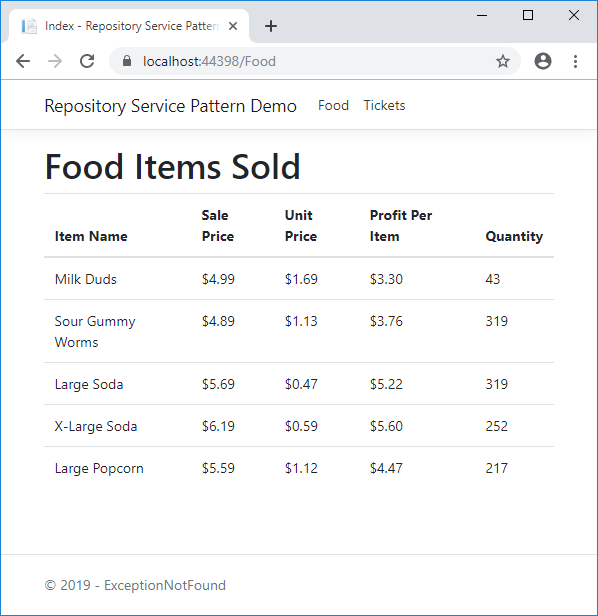
These two controllers and their actions give us a way to see the Tickets and Food Items sold, which accomplishes two of our goals. Here's a screenshot of the Food Items page:

And a Diet Coke, please.

We still have our Goal #3 to do, though. In order to see these stats on every page, we're going to create a new View Component.

Building the FinancialStatsViewComponent

A View Component in ASP.NET Core MVC consists of multiple parts. The first and most important part is a class, which implements the ViewComponent class. Our class looks like this:

public class FinancialStatsViewComponent : ViewComponent
{
    private readonly IFinancialsService _financialService;

    public FinancialStatsViewComponent(IFinancialsService financialService)
    {
        _financialService = financialService;
    }

    public Task<IViewComponentResult> InvokeAsync()
    {
        var stats = _financialService.GetStats();
        return Task.FromResult<IViewComponentResult>(View(stats));
    }
}

We also need a corresponding view, which will need to be located at ~/Views/Shared/Components/FinancialStats/Default.cshtml:

@model RepositoryServicePatternDemo.Core.Models.FinancialStats

<ul>
    <li class="d-inline-block">
        <strong>@Html.DisplayNameFor(x => x.AverageFoodItemProfit)</strong>
        @Html.DisplayFor(x => x.AverageFoodItemProfit)
    </li>
    <li class="d-inline-block">
        <strong>@Html.DisplayNameFor(x => x.AverageTicketProfit)</strong>
        @Html.DisplayFor(x => x.AverageTicketProfit)
    </li>
</ul>

Finally, we need to invoke this component on the _Layout view:

...
<div class="container">
    <main role="main" class="pb-3">
        @await Component.InvokeAsync("FinancialStats")
        @RenderBody()
    </main>
</div>
...

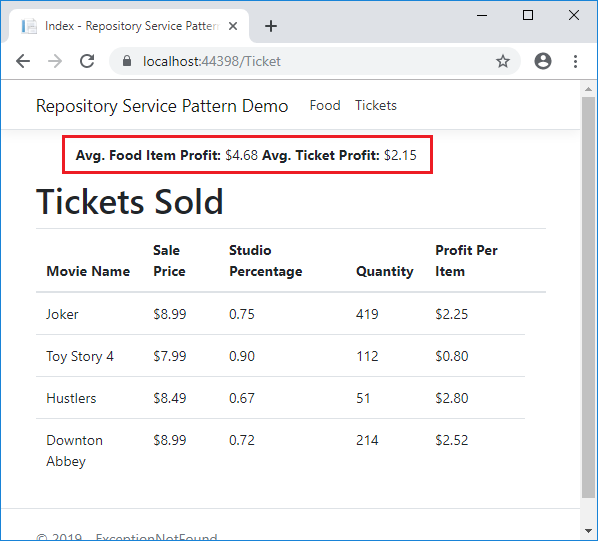
All of this results in the stats being visible on every page in the app, such as the Ticket Sales page:

That red box is there precisely so you won't notice the ASCII dragon until it's too late.

Ta-da!  We have accomplished out goals!  Time to celebrate with some movie candy!

Close up of sour gummy worms, all brightly colored.
First they're sour, then they're sweet, then they're stolen by my kids. Photo by Sylvanus Urban / Unsplash

Architecture Diagram

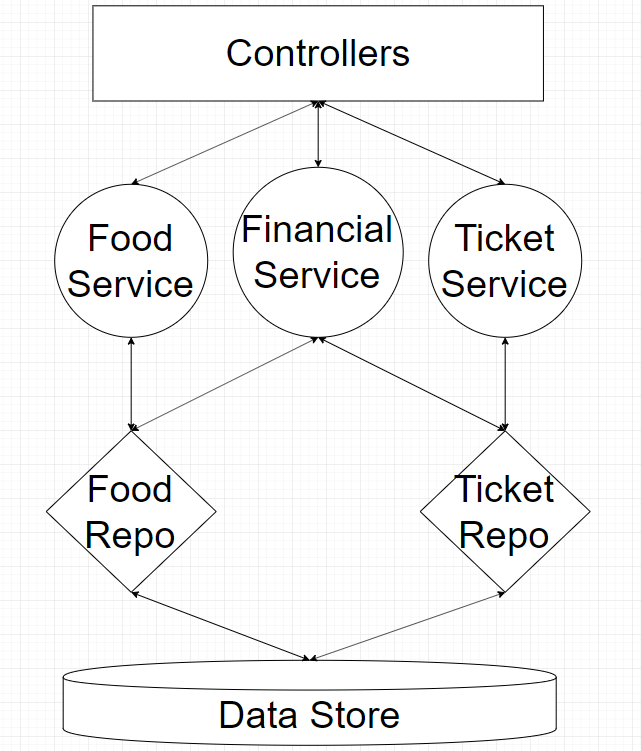
Here's the architecture diagram for the project we ended up building:

The diagram points out the major benefit to using this pattern: clear and consistent separation between the layers of the architecture. This gives us the ability to change one layer with minimal impact to the others, and with clear direction as to what each layer contains, we can do so quickly and with a minimum of code.

Drawback of This Pattern

The Repository-Service Pattern is a great pattern for situations in which you need to query for data from a complex data store or need some layers of separation between what happens for single models vs combinations of models. That said, it has one primary drawback that needs to be taken into account.

That drawback is simply this: it's a LOT of code, some of which might be totally unnecessary. The TicketService and FoodService classes from earlier do nothing except inherit from their corresponding Repositories. You could just as easily remove these classes and have the Repositories injected into the Controllers.

I personally will argue that any real-world app will be sufficiently complicated so as to warrant the additional Service layer, but it's not a hill I'll die on.

Summary

The Repository-Service Pattern is a great way to architect a real-world, complex application. Each of the layers (Repository and Service) have a well defined set of concerns and abilities, and by keeping the layers intact we can create an easily-modified, maintainable program architecture. There is one major drawback, but in my opinion it doesn't impact the pattern enough to stop using it.

That's all for this post! Don't forget to check out the sample project over on GitHub! Also, feel free to ask questions or submit improvements either on the comments in this post or on the project repository. I would love to hear my dear readers' opinions on this pattern and how, or if, they are using it in their real-world apps.

Finally, if this post helped you learn about the usage of the Repository-Service pattern, please consider buying me a coffee. Your support funds all of my projects and helps me keep traditional ads off this site. Thank you very much!

Happy Coding!

Cache Design and patterns

 In this article  we will look at application design and how cache design will be helping to get data from back end quickly.  scope of this ...